How to "Resize"
a picture using the SnagIt program.....
1 > We will assume that
you already have your pictures copied from your camera into your home listings
"Folder".
2 > Open the SnagIt
program and "Maximize"
 the
window if it isn't already.
the
window if it isn't already.
3 > Go to the menu
and click the "File" option and then click "Open...".
4 > Browse until you
find the folder that your home listings are in (that you copied from your
camera).
5 > Left "double"
click this folder and another window will open that will show the pictures you
have stored in there.
6 > Left "double"
click the picture that you want to resize and it will be displayed in another
window called the SnagIt Editor.
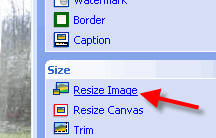
7 > Maximize this
window if it isn't already. Then click on the Resize Image menu option on
the right (see below).
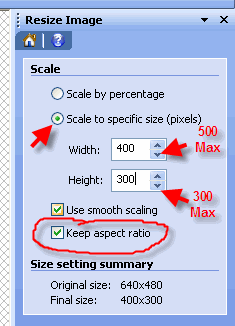
8 > Click the button
on the "Scale to specific size (pixels)" option... and insure the "Keep aspect
ratio" box is checked (this will insure your picture is not distorted when it is
resized).
Remember that the Width cannot be larger than 500 and
the Height cannot be larger than 300. The classifieds program will not
allow any picture to be upload/posted if either of these size limits are over
their maximum.
9 >
After you have the picture resized "click" the
File...Save As... menu options
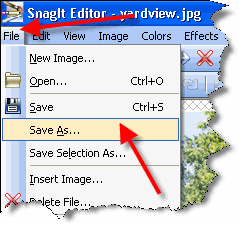
10 >
After you have the picture resized "click" the
File...Save As... menu options.
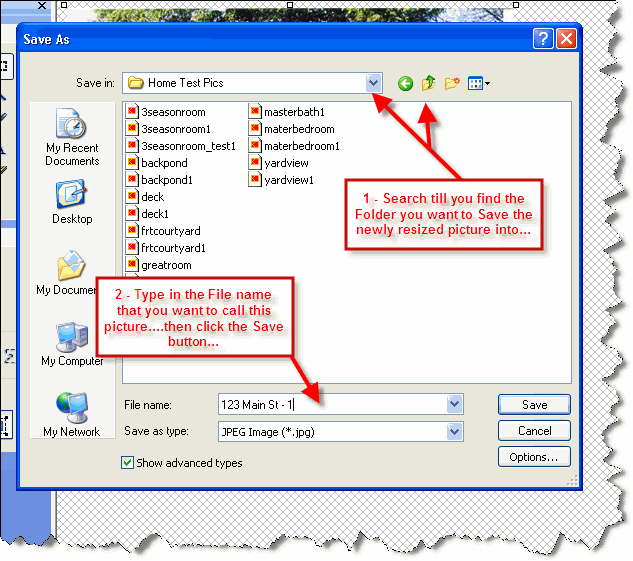
Locate the Folder where you want to save the picture into, then type in
the name of the newly resized picture.....then Click the Save button.
Now the home picture should be ready for you
when you go to Upload/Post it into
www.Quik-Homes.com classifieds program.